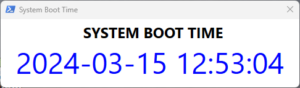
This is a Powershell script that display a popup showing when Computer was last booted. Popup looks like picture below.
Copy the code below to a powershell file, in this example:
”C:\PSTools\SystemBootTime.ps1”.
|
1 2 3 4 5 6 7 8 9 10 11 12 13 14 15 16 17 18 19 20 21 22 23 24 25 26 27 28 29 30 31 32 33 34 35 36 37 38 39 40 41 42 43 44 45 46 47 48 49 50 51 52 53 54 55 56 57 58 59 60 61 62 63 64 65 66 67 68 69 70 71 72 73 74 75 76 77 78 79 80 81 82 83 84 85 86 87 88 89 90 91 92 93 94 95 96 97 98 99 100 101 102 103 104 105 106 107 108 109 110 111 112 113 114 115 116 117 118 119 |
#region XAML [void][System.Reflection.Assembly]::LoadWithPartialName("System.Windows.Forms") [void][System.Reflection.Assembly]::LoadWithPartialName('presentationframework') [xml]$xamlMain = @' <Window x:Name="SystemBootTime" xmlns="http://schemas.microsoft.com/winfx/2006/xaml/presentation" xmlns:x="http://schemas.microsoft.com/winfx/2006/xaml" Title="System Boot Time" Height="150" Width="500" ResizeMode="NoResize"> <Grid> <TextBlock x:Name="SystemBootTime_Tbl" TextWrapping="Wrap" Text="" FontSize="48" HorizontalAlignment="Center" VerticalAlignment="Bottom" Margin="0,0,0,10" Foreground="#FF0004FF"/> <Label x:Name="label" Content="SYSTEM BOOT TIME" HorizontalAlignment="Center" Margin="10,0,0,0" VerticalAlignment="Top" FontWeight="Bold" FontSize="24"/> </Grid> </Window> '@ #endregion #region Read XAML $reader=(New-Object System.Xml.XmlNodeReader $xamlMain) $window=[Windows.Markup.XamlReader]::Load( $reader ) $namespace = @{ x = 'http://schemas.microsoft.com/winfx/2006/xaml' } $xpath_formobjects = "//*[@*[contains(translate(name(.),'n','N'),'Name')]]" # Create a variable for every named xaml element Select-Xml $xamlMain -Namespace $namespace -xpath $xpath_formobjects | ForEach-Object { $_.Node | ForEach-Object { Set-Variable -Name ($_.Name) -Value $window.FindName($_.Name) } } <# Select-Xml $xamlMain -Namespace $namespace -xpath $xpath_formobjects | ForEach-Object { $_.Node | ForEach-Object { $_.Name } } #> #endregion function move-window { param( [int]$newX, [int]$newY ) BEGIN { $signature = @' [DllImport("user32.dll")] public static extern bool MoveWindow( IntPtr hWnd, int X, int Y, int nWidth, int nHeight, bool bRepaint); [DllImport("user32.dll")] public static extern IntPtr GetForegroundWindow(); [DllImport("user32.dll")] public static extern bool GetWindowRect( HandleRef hWnd, out RECT lpRect); public struct RECT { public int Left; // x position of upper-left corner public int Top; // y position of upper-left corner public int Right; // x position of lower-right corner public int Bottom; // y position of lower-right corner } '@ Add-Type -MemberDefinition $signature -Name Wutils -Namespace WindowsUtils } PROCESS{ $phandle = [WindowsUtils.Wutils]::GetForegroundWindow() $o = New-Object -TypeName System.Object $href = New-Object -TypeName System.RunTime.InteropServices.HandleRef -ArgumentList $o, $phandle $rct = New-Object WindowsUtils.Wutils+RECT [WindowsUtils.Wutils]::GetWindowRect($href, [ref]$rct) $width = $rct.Right - $rct.Left $height = $window.Height <# $height = $rct.Bottom = $rct.Top $rct.Right $rct.Left $rct.Bottom $rct.Top $width $height #> [WindowsUtils.Wutils]::MoveWindow($phandle, $newX, $newY, $width, $height, $true) } } $PrimaryMonitorSize = [System.Windows.Forms.SystemInformation]::PrimaryMonitorSize $outstr=(NET STATISTICS WORKSTATION | where {$_ -like 'Stat*'} | Select-String -Pattern "\d{4}-\d{2}-\d{2} \d{2}:\d{2}:\d{2}").matches[0].value $SystemBootTime_Tbl.Text = $outstr $window.Add_Loaded({move-window ($PrimaryMonitorSize.Width - $window.Width - 20 ) 20}) $async = $window.Dispatcher.InvokeAsync({ $window.ShowDialog() | Out-Null }) $async.Wait() | Out-Null |
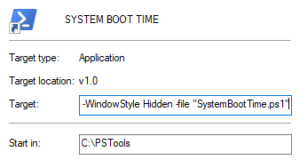
In the same directory create a shortcut of the file. Open the properties for the shortcut and replace the target path with:
|
1 |
C:\Windows\System32\WindowsPowerShell\v1.0\powershell.exe -NoProfile -WindowStyle Hidden -file "SystemBootTime.ps1" |
Ensure that the ”Start in:” path is ”C:\PSTools”.
If you want you can change the icon on the shortcut to reflect that it’s a powershell script. Copy the full path to the powershell executable:
|
1 |
C:\Windows\System32\WindowsPowerShell\v1.0\powershell.exe |
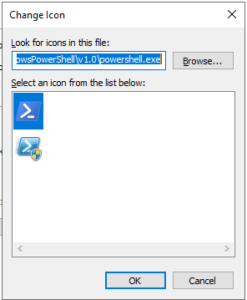
then click the ”Change Icon…” button and in the ”Look for icons in this file:” paste the path, press enter, select the first icon and then klick on ”OK”.
Save the changed to the shortcut.
This is all, to run the script simply doubleklick the shortcut.